Easter eggs and why every product should have them

Thursday, July 11, 2013

1. Go to Youtube.com
2. Play any video you want
3. Pause it
4. type (keyboard) 1980
5. That's an easteregg!

Unlike those colorful eggs associates with the Easter bunny which we all know, when talking about Easter eggs in technology products they mean a hidden little secret that are undocumented and many time, no one except for the developer knows that they are included in the product, some may be considered as cheats.

Easter eggs go far into the past but let's take a look at Atari (which for most of this blog readers is way back).
Atari didn't allow developers to credit their names, so they hid it in places hard to get and which required a special navigation to get to.

Atari Easter Egg (hidden developer's name).

Even good old Google has more than a few Easter eggs, here's just a few for you to try:

  • Google the term: do a barrel roll.
  • Search for atari breakout on Google Images.
  • A geeky one would be to search for recursion and having Google ask: Did you mean "Recursion".
  • Google for "binary" and get the number of results in binary instead of decimal.
The developers of vogue, have included an Easter egg that by pressing a specific key combination, shows a raptor with a fashionable hat running at the bottom of the screen.
www.vogue.co.uk - try "Up, Up, Down, Down, Left, Right, Left, Right, B, A"

You should definitely look for Easter eggs, one company hid a 1000$ bounty in their EULA (End user license agreement) - that thing which you always press "Yes, I read it", it was found only 7 years later (!!!).

An example from facebook who has its own Easter eggs:

Facebook has not skipped it's own Easter eggs - English Upside down.

Here is a mobile Easter egg found on safari browser on iPhone:


Speedtest.net's mobile app has an Easter egg dedicated to the cat which the company "Ookla" is named after:


So why does having Easter eggs in your product important?
First, it's a motivator for the developers.
This is the developer's unique footprint in the product that he is developing, all other stuff comes from the PM. It allows creativity and motivation to thrive and involves the important element of FUN.
Secondly, for the user of your product, finding these Easter eggs is (did we already mentioned) fun.
The element of discovery is amplified, and the satisfaction of finding one is so great as you find something most users have no idea of.

If you found any cool Easter eggs, please share them with the readers in the comments - Thanks!

5 Psychological concept to get users to take action

Sunday, January 6, 2013

Emotional Contagion:
Yes, some emotional expression is contagious.
Ever wondered why you yawn when you see someone else yawn?
This behavior is subconscious and since from an evolutionary  point of view we are a part of a herd, it is meant to send a social message.
Smiling has a similar effect, and here is where emotional contagion comes in handy in your product:
Just like the explanation above, when we see someone smiling at us we smile back sometimes uncontrollably.
When we smile our body releases serotonin, dopamine and other "feel-good" indicators.

When you use a smiling avatar or image, you contribute to the user's positive feelings and actions.

Obligation - Public commitment:
Did you ever promised yourself "I'll start a diet tomorrow" ?
If you did promise but didn't keep it, think now whether the outcome would have been different if you said it in public - most likely yes.
When we commit to something in front of others we are way more likely to inspire for completion of this commitment.
If a user shares a good thing about your product to facebook, and he gets likes showing that people paid attention to this piece of his, he is most likely to stand behind his statement in the future.

Authority and Likes:
We highly regard opinion and reviews made by specialists and people we like.
If I see a Mashable good quote about a product, I am likely to accept this quote as opposed to a user which I am not familiar with.
Having many reviews, testimonials, "as seen on...", etc. will gain you credibility and users will feel confident.

Scarcity:
Less is more.
We instinctively assign greater value to things which are in low availability due to the fear of losing them.
Good examples are: 4 last rooms available (in a hotel), 9 seats available on a specific flight, etc.
A good way to leverage this concept is to offer membership program.
An interesting implementation can be seen with Gilt.com, where offers are available for a specific time period, Premium users don't get a discount nor a free item, they get 15 minutes head start for auctions.
Yes, that's right, so think about scarcity next time you want to push sales.

Options:
We think we like to have many options to choose, we don't.
When building a flow in your product, don't give the user too much choice, he should have as least options as possible.
Too many options might cause confusion and inability to reach a decision, ending up in churning.

When your user breaks up - do U(x) break up?

Saturday, October 13, 2012

When a user decides to uninstall your product, does the outcome must be a lost user? No!
You can save that user, and it all depends on your approach!

A sub category within my product was showing high churning rates, and I was asked to come up with a solution to mitigate this behavior.
I started analyzing data and trying to get into the user's mind, and I asked myself - why do these users uninstall this product? it's useful, easy to use, and they downloaded it independently. So why do they uninstall?

Eventually I had to show some results, and fight back with the uninstallers!
I thought to myself that a user that has decided to uninstall and walk away from my product has a fixed state of mind. But the great thing here is that no matter what I'll do I can't get the situation worse! he is already uninstalling. What do I have to lose ?!
I decided to approach the users with a custom uninstall screen, right after they click remove/uninstall.
The screen had a neutral figure, mascot if you'd like, in the center of the screen, and two buttons on the sides: Keep and Uninstall.


When the user moved the mouse over the half part of the screen where the "Keep" button was, the neutral figure turned into a happy figure:

But when the user moved the mouse over the half part of the screen where the "Uninstall" button was, the figure turned to be upset:

This simple idea has saved 7% of the users that initially wanted to uninstall the product, but the connection between the figure and the emotion created by the effect caused these 7% users to reconsider the product.

The above screen is just an example, and obviously the figure shown had to do with the product itself, but I would suggest using it when possible.
Think about it as the last stop, last chance to engage your user before you lose him. You have nothing to lose at this point, give it your best shot - gamify the experience like in the above example. You might want to offer another incentive to make the user keep the product (i.e. temporary access to pro version, benefits in gaining status, etc.).

And again, the bottom line is - try it, you can't go wrong!
Good Luck!

Tools for Internet Product Managers

Monday, August 27, 2012

Hi all,
This post will be pretty much straight forward and will present the tools I use in my everyday work and can help anyone managing internet products.
I don't have any incentive for you to use them except for my pure advice to you.
Ohh and these tools... they are FREE


Visuals:
UI/UX are very important in every product, here are some tools that will help you in your work through design.

Mockups:
The most important tool to pass the idea in your mind to the engineering teams.
There are plenty of good and free tools out there, some are available online and some are downloadable clients.
Here are 2 good ones: mockflow, mockingbird

Pixel Ruler (download page):
This simple but efficient ruler allows you to measure up to a single pixel, and see if components are aligned.

               
Left mouse click will switch between horizontal and vertical, right click will close it.

Greenshot (download page):
A free open source tool for capturing screen images.
The tool allows you easily obfuscate sections of the image you don't want to expose.
You can add captions and draw basic chart forms (arrows, box, etc.).
It simply catches the standard printscreen command from your keyboard.


GIMP (download page):
Your designer most likely works with Photoshop, but in cases where you want or need to get your hands dirty with visual design, GIMP is your solution.
Gimp is an image manipulation program, think of it as a free version of Photoshop with many features, some basic compared to Photoshop and some pretty close.
I wouldn't say it's a fair substitute to Photoshop but some might disagree, either way it's a great open source tool.
In addition it's not too intuitive for those unfamiliar with design programs, hence consider some learning hours when trying it out.


Environment:

Fiddler (download page):
No internet professional's working station should be found without this web debugger.
Fiddler monitors all the calls and replies to/from the client and shows you everything you can ask for in regards to each call like response code, headers, cookies and much more.


JsonViewer (download page):
Don't try to read a long JSON string. use this simple tool where you enter the text and immediately can navigate through the items in a hierarchical form.

XML Formatter - Notepad++ plugin (download page):
Easy tool to work with XML, just install the plugin and you can get it to beautify the tags which will make your work easier.


CookieManager (download page):
Simply, view, edit, delete existing cookies.
Cookie manager is an add on for Fire Fox (tools -> Cookie Manager).
Very useful when you need to manipulate a cookie for tests with your own data or test data.


FireBug (download):
Another development handy tool, which you as a product manager might not use to it's full power.
FireBug is a FireFox extension which allows to you to get or set (inspect) any parameter on the current HTML page.
You can use it to understand how other pages are doing what they do, see the effect of style and layout change immediately, make sure the page is built with the right settings, monitor performance and much more.

ChromeBug (download page):
Let's make it simple, it's FireBug for Chrome.

Inspect element:
You might not need FireBug or ChromeBug for your work at all.
Why? well, first Chrome includes this feature and so do the latest FF versions, so it's you choice which one works better for you.

In FireFox and Chrome you need to right click the element and select Inspect Element, in Internet Explorer (IE 8 and above), you will have to turn on the developers tools (F12) and select the arrow icon and point the element on the site.
This option will enable you to inspect, see real-time affect on style and layout changes.

I hope you find this post useful, please comment if you believe other alternatives are better or in case I am missing a tool in the above toolbox,
Thanks!

Crowdsource

Wednesday, June 6, 2012

Unless you do not update on trends, you have heard of Crowdsourcing.

Crowdsourcing can be also called multi-sourcing, distributed sourcing and so on, it simply means there is not a single source, not a one point to contact for a specific issue or task.
Crowdsource is the concept of using the power of a crowds to accomplish a task.
For example see what Google had done, it has no support on its behalf, everything is managed through their forums.

Crowdsource should be strongly integrated with gamification.
Take for instance stackoverflow which has questions posted with number of views,  number answers, some social aspects on the user taking part in the thread of the question and more.
The developers community is helping itself by answering the questions opened by members in the forum:


A cool thing is that for orphaned questions with no answer, it offers an award of points bounty:


But do not mistake crowdsource for support solutions only.
A few years back, Google faced a problem coming to index images. It had a huge amount of images with index that it didn’t trust.
Google wanted to label the images and did it using a crowdsource game, where each time 2 people from around the world got the same image and had to write what the image is.
If both got an image with a cat, and both wrote that there is a cat in that image, then most likely the image is a cat image. Google had labeled an incredible number of images and photos like this.
From the users’ point of view, they were happy to see that I, Joe from NYC identified an image same as Chang from Beijing.

You might have asked yourself why should one invest his time in helping the masses? How come this crowdsource idea is working well?
Research have shown that motivating a person by giving him more money or other material benefits is effective for the short run, but in the long run people will do what they are interested in and show off what they believe they are good at.

The bottom line is that crowdsource will get wider and include gamification concepts to increase the response rate and input quality.
Crowdcourse is a wonderful driver to supportive solutions by the community, and it brings great value to a company and to the community in return.

Product design workshop insights

Tuesday, February 21, 2012

Hi all !
Conferences and workshops are common events we all take part in, but only few are eventually worth  our time.
I would like to share with you the insights I gathered in the Product Design Workshop held by Ben Blumenfeld - Product design manager for facebook.

Along the insights I added questions you should be asking yourself on order to apply the insights and improve your product. So without further a dew, let's kick it off:

Day 1 (Brand):
Brand (definition): A person's feeling about a product, service or company.
Brand has a financial value. Google for example has 140B$ for brand name value !!!
Brand drives choice.

What makes a great brand? a meaningful promise to consumers/users, and time & time again deliver on that promise. (Apple is percepted as innovative company and time over time it delivers on this promise - Mac, iPod, iPhone, iPad, Siri).

Questions for you:
What is your meaningful promise/mission?
       - facebook promises to help people share and connect with the people in their lives.
       - Google promises to organize the world's information.
How could you deliver on that promise?
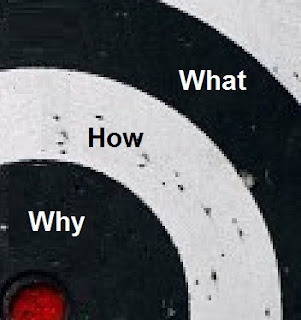
People buy because of why you do it, and not how or what. Dell had music players before the iPod, HP had tablets before the iPad...

Questions for you:
What do you believe?
       - We believe people should have equal access to information.
       - we believe in thinking differently.

Day2 (Visual design):
The visual design building blocks are the following:

Color
Fast food chains like KFC are using bright primarily colors since they must overcome the "noise" in the street and stand out.
Inside the fast food chains one will also find strong colors that make you uncomfortable which is intended to get you out right after you are done eating and maximizing turnover.
Sturbucks on the other hand has very pleasant colors indoors to make you feel comfortable like at home and stay and drink as many coffee cups you want.
Pinterest - yellow bar with red button - obvious call to action.
Airbnb - has too many calls to action (List you space, search and see infographics).

Shape
Financial brands are square - indicate stability
Some insights from facebook - they use rounded corners since it gives a more comfortable feeling but it comes over speed since these rounded corners load slower ( a trade off that needed to done).

Scale
The eye goes to largest thing first and so on.
See how the eye goes first to the right image of the phone, than to the left upper part - logo and application name and finishes at the button - the call to action.

Value/Contrast
In order to create hierarchy in the product use contrast, pay attention not to make things look like they are disabled...
Here we see how the gray level creates a hierarchy between the focused tab, tabs with further menus under them and finally leaf categories.

Typography
Great way to create a tone or a mood.

Composition
Like when taking a photo, use the thirds method - put important objects on the intersection of the thirds line.
You can also use imaginary diagonals to emphasis a point.

Grid
Keep things ordered when you use a grid in your product layout.
Pay attention that when using a grid, the eye might join separate sections together just since they are in the same row or column.

All these concepts end up to one thing, what I want to communicate to my users.

Day3 (Interaction Design):
Simplicity
Be data informed, not driven 
Know what you're optimizing 
Awesome payoffs 
       - Donate money and we will post your photo on our website.
       - Casino are great at this. Slot machines are optimized to generate a visual impact and sound you are seeking when you win, whereas 
         when you lose it's desert silent.
No dead ends 
       - if I look Metalllica (3 times the letter l instead of 2) on the iTunes client you will get no results, but if I run this    
         on the iTunes web site I will get "Did you mean Metallica?"
       - If I ask a question on Quora and no one answers, instead of leaving this thread orphaned, they offered you the 
         option to engage and ask someone specific to answer it - wouldn't you answer it if asked personally?


       - Facebook's message: John Smith has accepted your friend request. Write on his wall.
         So here you are not just informed but get an option to continue acting in the connection.

In product marketing
       - Facebook ads "Create an Ad". User sees a cool ad and thinks "ohh cool why shouldn't I create an ad?!"

Social design
       - Pinterest - see people, content, conversations.
       - Dailymile - One of your friends didn't work out in a year. Send a personal message saying "I miss your activity 
         posts"
       - Hulu is a bad example, they have the social data but it's placed at the bottom of the page and user needs  to 
         scroll to see it. I am more likely to watch something that my friends are watching or commentating on so why not 
         use it ?

All these concepts for interaction design are meant to satisfy the needs & desires of people using the product.

I am sure you are familiar with most of the points I describe above, but if it only made you rethink your product and freshen your memory on these aspects by the real world examples - I got what I wanted, thanks for reading!

Gamified training experience

Tuesday, January 24, 2012

Congratulations! You have just bought a new software pack.
You had to pick between the Standard version or the Professional version which includes dozens of features you don’t really know what they are used for, but you were convinced you might need them someday and it would be useful to have them (haven't we all been there?!).

Ok, now you have installed the software and you are ready to rumble! When suddenly it strikes you… You have no idea how to work those features out !!!

In this post I want to present some products that have used Gamification for a teaching experience.
Remember clippy ?
Microsoft used this character to suggest help on all sorts of actions the user came across.
But lately Microsoft has introduced Ribbon Hero 2 for teaching Office 2007 and 2010 through a themed Gamified experience which takes the "getting to know the product" experience to a whole new level.


You are taken through the various capabilities by simplified missions and gather points, badges and titles along the way, like the following example: 


Another Software that provides a cool plug in to push you into becoming an advanced user is LevelUp for Photoshop.
LevelUp becomes part of Photoshop’s window and present you with an image that needs work.
Missions are to fix the image and you get a thorough guidance on the various tools and additional tips and tricks.
As further you advance you get points and badges to symbolize your level. Additional credit is given on timing of individual assignment and the total pace.


For top motivated users, a leaders board can be found on Adobe’s website:


To conclude this short Gamification implementation: be open minded, Gamification can be implemented in various functions in your product, by encouraging the user to learn about your product he truly understands the benefit and added value of your product.
Finally think about the hours it took to design and implement one of these advanced features – you surely want it to be in use.


Gamification in eCommerce

Wednesday, October 19, 2011

After introducing Gamification to some of my colleagues who didn't hear about it before or have just
heared the buzzword somewhere, we obviosely started a conversation and one of my friends who owns an
eCommerce site asked me how can gamification come in handy, particularly in eCommerce website?

Let's start by looking at existing applications and products that use gamification in eCommerce sites:
One of the most known sites is eBay who is using the bidding system for selling items.
The bidding itself generates a gaming state of mind, where I feel I am competing with others to get this item I want, and once I am in - I want to get it, and many times I lose my reasoning trying to win, when bidders pull each other - reaching higher in the bidding price, and if I win I get rewarded with the product by paying a low price for it.
The bidding involves strategy (I will bid once to enter the race and I will wait until it's quiet to "attack").
Some other sites will charge a certain fee  for each bid (around 50 cents) generating a need to defend an "investment" they have done, as silly as it is, it works, and while most bidders will waste their money - covering the product price sometimes a few hundred percents more than it's winning price, one lucky bidder will win the product for a low price.

Allegory of a real situation in life to a more familiar field can also increase engagement and sales in eCommerce sites.
I have seen a forex trading site that presented a match between two currencies for example USD($)  vs GBP(£) (Sterling), and the people had to put their money on who will have a greater change compared to the other.
"eToro provides a simple, transparent and enjoyable way to invest and trade in currencies, commodities and indices online".

Visualize products - let's have a look at a racing game - I am about to chose my car, see how it turns so I can see it from all angles in addition to it's specs - why not show your product in your eCommerce site like this instead or in addition to a simple photo ?


Have it turning around so clients can see it from different angles, maybe notice a property which will make a "maybe" to a "yes".

Demonstration - The Sims, Farmvile and others have a SPATIAL (special too maybe...) view in the game, meaning an object in an environment which it belongs to. If you are selling for example a couch, why not present a spacial ilustration of a room where the selected couch is accompanied with complemetary products to increase sale or to reduce product-returns when the buyer finds out the couch doesn't fit to his wall tapets or other furniture.
The idea here is to make the user have as little decisions as possible and help him imagine and illustrate your product in his environment, where he will use it.
Perhaps than he will add more items to his cart.


Loyalty programs - take a close look into your wallet and count the number of loyalty cards you have... now think about it for a second, these cards are intended to eventually bring you back to the same store who issued the loyalty card, in return you get a discount or some sort of a reward.
Today, with gamification entering the commerce field we can see a change from loyalty to engagement.
Apps like Foursquare, gowalla, Shopkick and others hands out geo-location based coupons, have nothing to do with one particular business or a certain type of customers - they address you according to where you are NOW.

Like the idea of the drive-through which was pioneered in the 1930s where you are already in the car sitting comfortable, and drive next to a cabin to buy food, today everybody's comfort is in their mobile devices or other form of computers, so the shift today has to be towards social media.
The engagement comprehension is crucial these days where a large portion of people use social media. They are already there, on Facebook, Google+, LinkedIn, twitter, whatever... the goal is to engage your users in these areas where they feel comfortable and use on a daily basis, make an integral use of your engagement and their behavior.

Tasti-D-light will grant you a point on every social share (no loyalty card, instead - engagement).


Process line/level progress - Another useful Technic is presenting the phases along the way to achieve the final task - purchasing.
Pay a careful attention to this process where users might abandon the purchase if they need to work hard or it's not very intuitive.
If I am going through a long process, but I see the stage I am in at the moment within the WHOLE process it will have a significant effect on my decision to complete the process and not abandon it.
By showing the clients the process and their current situation within the process, you increase the completion rate for purchasing.


I will rap up with a touch on badges, which are to my opinion the most common use of gamification at the moment, can be applied in eCommerce too by rewarding a returning client with a status badge (Exp: Valuable Customer) providing him a discount  or some other form of actual value to his badge-status.

Eat your own dog food

Sunday, October 9, 2011

Here is a short story to get you into the idea:

I looooove cacks!
Actually I have just prepared a delicious chocolate cake, can I offer you a piece?
Sure, thanks
What about you? You are not having a portion?
Ohh, no…, I don’t like eating it, I just like baking it.
I see… hmmm, you know what… I don’t feel like it anymore …

This guy is right – if I don’t eat my own baked cake why should he???

What I am talking about here is called in the professional slang “eat your own dog food”. Put simple it means – use the product you develop.
Recently it has been in the headlines that Google’s senior management are not eating their dog food when it comes to Google+.
Some might say that not every product is intended to be used by the people who develop it and that they might just be outside the target audience – True, but in this specific example where in today’s technology reality all senior holding positions are sharing and being followed on social media, it just hurts them.
Think of the implications, the developers feel the senior management does not think it is good enough to use and once this came out to the technology news, it hurt the attempt to raise the user base.

I believe in every product manager lies an entrepreneur, otherwise where would new ideas come from?  
I remember myself that every feature I suggested or any new idea for the “next BIG thing”  had one common thing. Irrelevant the technology which was to be used, no matter who had to implement, regardless of the current client profile. It all summed up to one intention, something I see as mandatory … something that I WILL USE.

Let’s take a second to think what is this approach good for?
By relying on the product you develop, you encourage yourself and those involved to maximize quality and improve the user experience.
Creative thinking comes when you run into a missing functionality in the product where instead of contacting the support or account management in the company who developed it, you end up raising this in a team meeting or your very own project manager, and it is all because it bothers you PERSONALLY and you feel this change will make the product better.
The general message a company sends out by doing so is that it considers its product to be the best in the market.

A great example of a company which eats its own dog food is Microsoft where the whole company uses Windows OS. In addition, as far as I know, all of Microsoft new products are developed through Visual Studio.
Another, closer example to most people is Facebook, where CEO Mark Zuckerberg and Facebook CTO Bret Taylor (Which I am subscribed to follow)  use facebook for everyday social activities, it’s very common to read Bret comment on the latest UCLA game, and it seems that their new features and ideas come from them using facebook.

Intoduction to Gamification - future concept for applications

Wednesday, September 28, 2011

Continuing the last post about being a Technology Junkie, I would like to introduce to who is not familiar with a rising trend called gamification.
As I mentioned in Technology Junkie post, the product manager must be up to date with technology innovations and trends, however gamification is not a technology but rather a design concept.
Gamification means you take your product or service and bring it to a point where it gets fun using it like a game (from here it gets the name...) by applying game technic and thinking.
KPCB (Kleiner Perkins Caufild & Byers): "Ultimate way to engage a new generation of audiences"
Gartner: "50% of Innovation will be Gamified by 2015" - what do you call a trend if not this?!

Check out this graph to get an idea of the rising interest in gamification:


According to Brian Burke, an analyst at Gartner, “Enterprise architects, CIOs and IT planners must be aware of, and lead, the business trend of gamification, educate their business counterparts and collaborate in the evaluation of opportunities within the organization.”

How is gamification implemented :
"Enterprise architects must be ready to contribute to gamification strategy formulation and should try at least one gaming exercise as part of their enterprise context planning efforts this year".
Badges - A virtual sign for accomplishing something, for example a gold/silver/bronze medal for forum users according to their participation and quality of answers. users will put more effort if they know they are close to earning a badge. (Yahoo! research)
Momentum - keep your users do what they have been doing so far and not less by being an effective motivator.
Bonuses - rewards for doing something right after it has been done.
Encourage productivity - the game convinces the player he is enjoying the game and wants to continue playing over doing something else.
Cascade exposure - expose the user to small segments of information to have him adjusted to them and only then continue, like game levels.
Community collaboration - All users involved in achieving a common goal by each contributing something until it adds up to the final goal. for example answering a question in a forum.
Countdown - think of car racing games where you have a lap-time you need to beat. you are focused on the time target and focused on not exiting the track in the tight curves to finish the lap successfully.
Discovery - Everyone loves to explore and have new things revealed to them, any element of surprise will leave a certain impact on the end user, take for example a productive "hallway-talk" in your office corridor - you didn't see that conversation coming until it happened and BAM you managed to close a long-open issue in a matter of 2-3 minutes.
Free Lunch - Get something thanks to someone elses work. Groupon will enable a discount deal if at least 100 people will sign up for it.
Renewed content - same general idea with new content. a survey which keeps changing questions.

Gamification has more concepts and the above just shows the beginning.


Examples of gamification in applications around the world :
Groupon: Free Lunch,  Renewed content, Cascade exposure
StackOverflow: Badges, Community collaboration
StumbleUpon: Momentum, Community collaboration, Free Lunch
TurboTax: A tax refund program that walks the user through the boring process of tax refund like a GPS - step by step at every turn, uses badges, cascade exposure, momentum.
WeightWatchers: The program uses points, virtual rewards, goals with milestones, leader board, etc.


By using gamification, the organization can benefit from larger engagement rates, higher working performance, accelerated cycles of product flows like question solving and feedback, lower bounce rate, grouping people to achieve a common or organizational goal, increase adaptation etc.

If you are still skeptic about gamification (how can that be possible ?!!?!?) here is a study done at the University of Maryland about "The Facebook app economy". It describes the effect of Facebook and Facebook applications on US economy, where companies go toward gamification to engage their customers.

There are lots of aspects to consider in gamification ,hence, I promise to write more about this in the upcoming posts.

Technology Junkie

Wednesday, September 21, 2011

Two days ago I met with an old friend for dinner.
He used to be a bit chubbi, wearing XML size shirts, but it's not right for a guy named JSON, so he went on a diet, and started training in martial arts at the nearby DOJO. Now he is really lightweight.
We set down at our table ready to order
Waiter: Allow me to recommend our special dish for tonight, LAMP ribs, it comes with everything and will satisfy you for sure.
Me: you know what, I'll actually go for the HTML5 boilerplate, looks to me as a simple dish, I don't like complication in food I am not familiar with.
Waiter: what would you like to drink ?
Me: I will drink CSS Sprites.
Everything was great except the Silverlight were a bit heavy, I would prefer a minification version of them :)
At the end I was like WOFF... I am so full, it makes no adsense - I ate so little...
On our way out I noticed the nice decorations, canvas for HTML5 covered with CLOUD images.

Two posts ago I noted the key reasons I see in being a PM. One of them was technical consultant.

A PM must be technical even if not all the way down to the bits and bytes but he must have the drive to discover and understand how stuff works, how things can be done - implemented.

I agree some of the technologies are to be decided by the engineers but it comes to raise the question - will you know what they are talking about if it comes up ? if a technology issue will hold your product back - can you find your way through ?

Keep up to date with the latest innovations and new technologies by following blogs, visiting conventions, webinars, talk to your colleagues.

Many technology professionals don't like to dive into a new version before the 2nd release comes out - I on the other hand am not afraid to dive into a new technology adventure, as long as it's done wisely with a good understanding of what is at risk and obviousness after you have tested it in you development and QA environments.

Bottom line - if you want your engineers to respect you and to raise a great product with the right technology and easiest implementation, you must be at the technology frontier since technology is your tool.

Think out of the box

Tuesday, September 6, 2011

I love innovation, and that's what new features, in a way, are.
But how can I make these new features lead me to the next best THING ?
It seems it is all in the state of mind of the PM.

My field of interest is mainly technology but we can cast almost every example on different fields, so let's take the following case just to simplify things and not get into technical corners:

Market need   : Reducing car accidents which involve company cars.
The product    : A vehicle sensor which monitors the driving habits of drivers of the car and report to the transport officer in the company.
Requirements  : Monitor speed, acceleration, sudden breaks , etc.
Brain storming : a straight forward thinking would suggest attaching this device to the car wheels axis with attachment to break system and other car-intrusive connections.
A more creative way might be to design an independent unit with an acceleratot meter calculating speed and also detects sudden breaks.
Ohh WAIT! don't all the drivers in the company have 3G cell phones with them in the car ? don't they all have a Gyroscope ? Well... let's use that!

Wikipedia on Gyroscope : "Currently Gyroscopes are also being used in Apples' ipad & iphone. In sync with accelerometer it provides 6-axis motion sensing. It allows the iPad to measure in which direction device is being moved/rotated in space (roll, pitch and yaw), how much and how fast."

This is a creative thinking idea, which is easy to implement, provides the solution for the requirements and is user friendly.


It's the product managers' job to think like the user and in the same time think different to improve the experience and functionality and get new ideas and new breakthroughs.
I believe a good PM will take educated thought of every new feature and MUST try to take one step back and think creatively and out of the box.

Why be a product manager?

Thursday, September 1, 2011

This is a very important question to ask yourself in the beginning of the way to becoming a PM.
You might see this position as a perfect, glowing, and awarding job with very little disadvantages.

Imagin... :
Highly compensated
Millions of users use your product
Engineering supports every decision you make
Promoted to VP in the future
You are poping new ideas faster than they can be implemented
Satisfied customers

Pufff... let's blow that bubble and take a look at the other side of the coin... :
Engineers are working on other products
Product is "sales-driven"
Authority ?! remove that from your vocabulary
Buggy product
Need to supply answers to the board of managers
Less and less users are using the product
No time to meet friends

My point here is you must know what your are getting into.

Finally, each one has its own reasons but they generally overlap and sum up to:


  • Passion - you must live the product domain to make it good  - I'll get a better Facebook app managed by a Social Networks junkie rather than a Mainframe programmer who never uses open environments.
  • Promotion - you get to manage a wide range of talents and report to the high ranks.
  • Make a change - products in your domain probably exist - make a difference, leave a mark.
  • Technical consultant, less spending time on bugs over bits and bytes - Still... being technical IS your business.
  • Responsibility - if the product sucks and clients are not satisfied, it doesn't matter how good you are.
  • Influence - you decide if it's right or left, blue or pink, night or day.
  • Learn - by now you probably took on specific responsibility positions - now you overlook the whole cycle.
  • Initiate - raise your own ideas, push and bring them to implementation.
  • Satisfaction - you can say "this is mine".


The first post - Introduction

Wednesday, August 31, 2011

Hello dear readers, my name is Ted and this blog is going to follow me along the hard way of becoming a Product Manager.
"Is this guy for real? ..." - yes I am. It's said that "Nothing stands in the way of your will" and I got will - to become a PM.
I address this blog to all the professionals out there who look up to become product managers one day but still get stuck in the initial phase - getting your first job as a PM.

As this is my first post I would like to join many others professionals who want to advance to PM and share my experience.
--B.Sc. in Computer Science 
--8 years of working experience in hi-tech industry
--DBA Oracle
--Application Securityt team leader
--DBA Oracle and Sql Server team leader

For the next post I am asking you to thing and try to figure out - why?
Why do I want to be a Product Manager ?